

ReverseRAT Malware (SideCopy Spear-Phishing Campaign)
Original Issue Date:-
October 15, 2026
Virus Type:- Remote Access Trojan
Severity:-
Medium
It has been reported that the SideCopy APT group is conducting targeted spear-phishing campaigns against Indian organisations, including academic institutions. In these campaigns, a multi-stage infection chain is employed to deploy ReverseRAT malware on targeted Windows systems.
The campaign employs deceptive email attachments, malicious Windows shortcut (LNK) files, HTML Application (HTA) scripts and legitimate Windows utilities to execute malicious code while attempting to evade security detection. The malware also establishes persistence to maintain access after the infected system is restarted.
Infection Mechanism:
The infection begins with a spear-phishing email containing a malicious ZIP archive that includes a deceptive Windows shortcut (LNK) file and a decoy document. When the shortcut is executed, it downloads an obfuscated HTML Application (HTA) file from an attacker-controlled server and executes it using the legitimate Windows utility mshta.exe.
The HTA file loads a malicious Dynamic Link Library (DLL), which extracts additional components including batch scripts and a second-stage HTA file. The malware establishes persistence by modifying Windows Registry Run keys, allowing it to execute automatically when the user logs in or the system restarts.
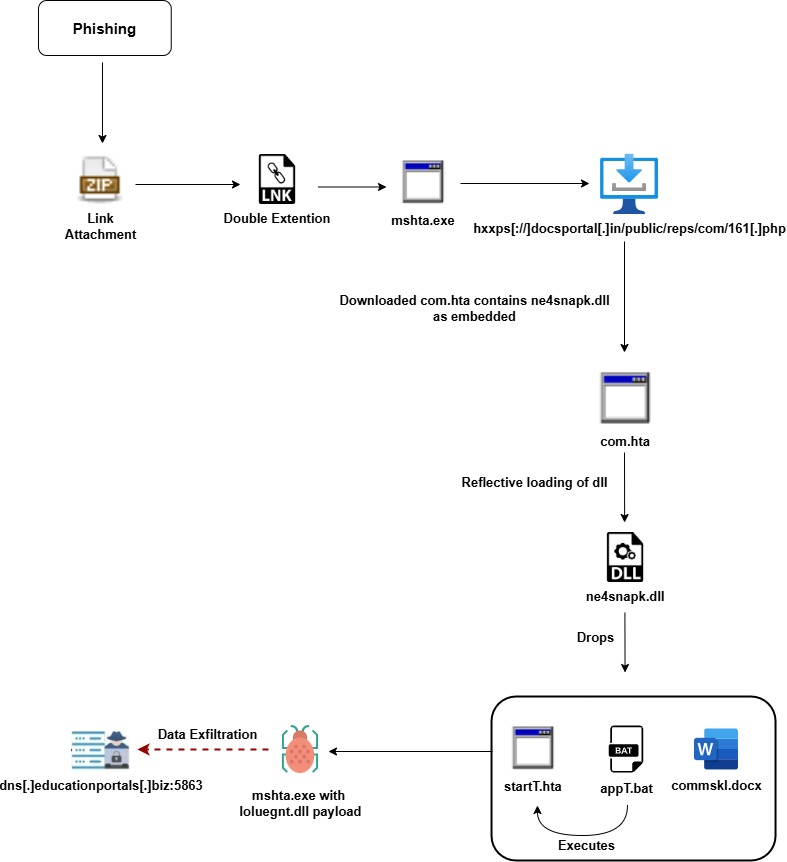
In the subsequent stage, obfuscated scripts use .NET deserialisation and reflective loading techniques to execute the ReverseRAT payload in memory. Once active, ReverseRAT communicates with command-and-control (C2) infrastructure, enabling the attacker to execute commands remotely, collect system information, capture screenshots, steal passwords and clipboard contents, manipulate files and further exfiltrate sensitive information from the compromised system
Indicator of Compromise:
URL:- dns[.]educationportals[.]biz
- hxxps[://]docsportal[.]in/public/reps/com/com[.]hta
- hxxp[://]docsportal[.]in/public/reps/com/com[.]hta
- hxxps[://]docsportal[.]in/public/reps/com/161[.]php
- 0647336477bdd277450b0c36f104f3f82da721e98d56b67bbeeec05cc48f2d1c
- 0e0b77f79fe5d06f11de2959559379e94d62512e073c267b481a58d19d265240
- 34c20f5abc04375822f3f68e3e9915c7e388e8adb1ade597672920d53f2c067c
- ac340859805220f97f98b299b32d82b1ccbb2c04c8c09516f3937feda937af80
- 45[.]61[.]157[.]22
For more detailed list of IoC, kindly refer the below URL:
Best Practices and Recommendations:
- Do not open unexpected ZIP archives, Windows shortcut files or documents received through unsolicited emails. Verify the sender and the legitimacy of the message through an independent communication channel.
- Avoid downloading documents, software or utilities from unknown websites and suspicious links.
- Where operationally feasible, use application-control policies such as AppLocker or Windows Defender Application Control to restrict unauthorised execution of mshta.exe and HTA files.
- Keep antivirus and endpoint detection and response (EDR) solutions updated. Enable behavioural detection for suspicious process execution, in-memory payload loading and unusual network activity initiated by mshta.exe.
- Investigate unexpected modifications to Registry Run keys, particularly entries that execute scripts or binaries from unusual directories.
- Configure email security gateways to detect and quarantine malicious archives, LNK files, HTA files and other potentially dangerous attachments.
- Review outbound connections to unusual ports and investigate communications with known malicious infrastructure. Apply validated indicators through appropriate security controls.
- Keep operating systems, applications and endpoint security products updated with the latest security patches.
- Avoid using administrator accounts for routine activities. Restrict access to sensitive systems, files and network resources.
- Configure email, web filtering and endpoint security solutions to block downloads of executable files and archives from untrusted or newly observed domains.
- Back up critical information regularly and keep protected, offline or otherwise isolated copies to support recovery following a security incident.
- Isolate affected systems from the network, preserve relevant logs and evidence and initiate incident-response procedures. Reset potentially compromised credentials from a clean device after investigating the incident.
References:
- https://www.trellix.com/blogs/research/sidecopy-threat-intel-mshta-execution-rat-deployment/
- https://thehackernews.com/2026/06/pakistan-linked-sidecopy-targets.html
- https://cyble.com/threat-actor-profiles/sidecopy/
- https://www.seqrite.com/blog/umbrella-of-pakistani-threats-converging-tactics-of-cyber-operations-targeting-india/
- https://www.seqrite.com/documents/en/white-papers/Seqrite-WhitePaper-Operation-SideCopy.pdf